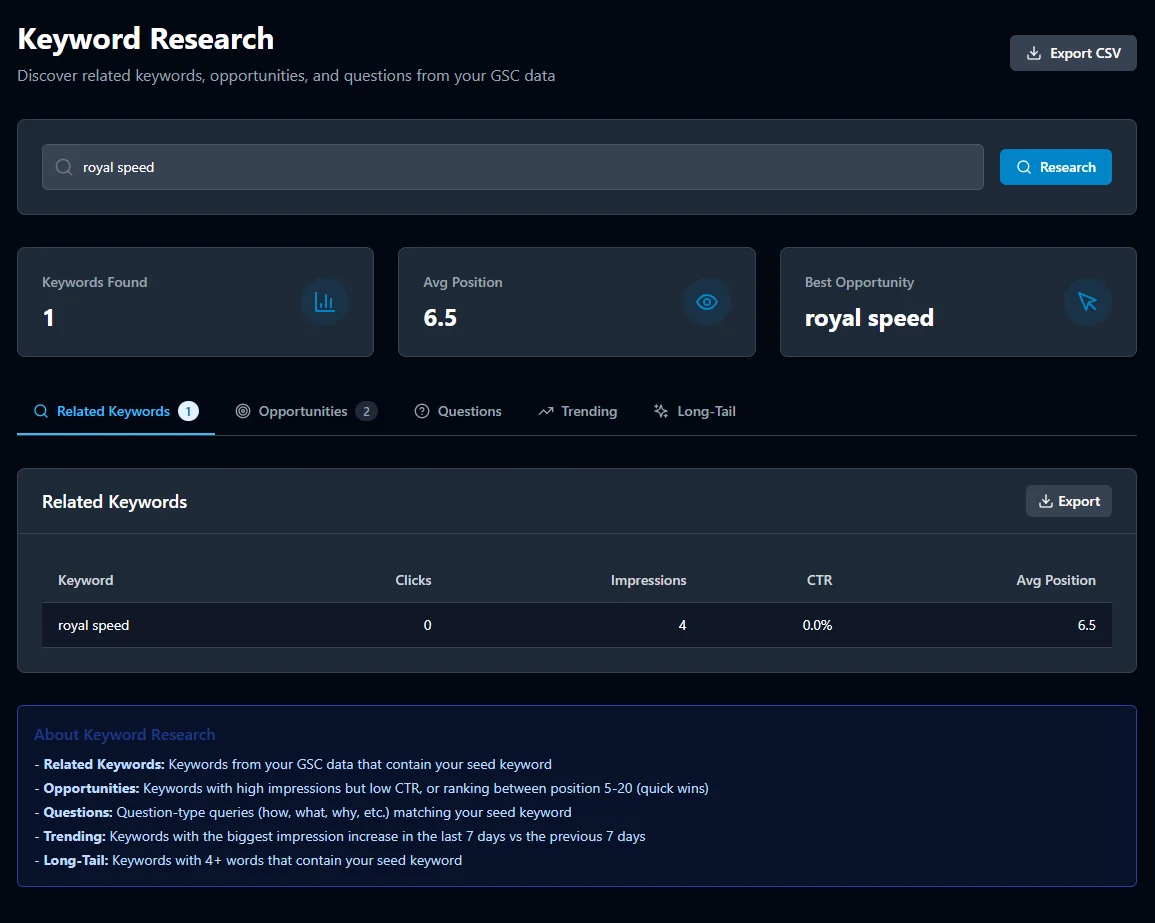
The keyword research with metrics such as search volume, keyword difficulty, CPC, and trend data. According to Ahrefs, 94.74% of keywords get fewer than 10 searches per month in 2025. We designed our research tools tool that uses real Google Search Console data — not estimated volumes — to surface the exact keywords your site is already ranking for, underperforming on, and ready to win. Five research modes. Zero guesswork.
Most SEO keyword research tools rely on third-party estimates and clickstream data. SEObolt connects directly to your Google Search Console account, giving you the keywords your site actually appears for — with real impressions, real clicks, and real average positions.
SEObolt's keyword finder gives you five distinct research modes, each designed to uncover a different type of keyword opportunity. Switch between modes instantly — all powered by the same GSC data source. For example, the Opportunities mode surfaces keywords ranking on positions 8-15 with high impressions, while the Questions mode filters for actual user questions such as "how to," "what is," and "why does."
Enter a seed keyword and discover every related term your site already appears for. Uncover semantic clusters and topical gaps you didn't know existed. Perfect for building comprehensive content hubs.
The keyword opportunity finder that surfaces your highest-impact keywords: terms where you rank on page 2 or the bottom of page 1, with strong impressions but low clicks. These are your quickest wins.
Discover the questions real users are asking that trigger your site in search. Ideal for FAQ sections, blog posts, and featured snippet targeting. Powered by actual search queries, not keyword databases.
Spot keywords with rising impression counts before your competitors do. SEObolt detects upward momentum in your GSC data and surfaces trending terms so you can create timely, high-demand content.
Find low-competition, highly specific keyword phrases that are easier to rank for. Long-tail keywords often have higher conversion rates and lower difficulty — the sweet spot for growing sites. For example, "best WordPress security plugin for WooCommerce" converts at 3x the rate of "WordPress security plugin."
Stop guessing which keywords to target. SEObolt's Opportunity mode analyzes your current rankings, impressions, and CTR to find keywords where a small improvement in position would drive a significant increase in organic traffic. Backlinko's analysis of 4 million Google results found that moving up a single position increases relative CTR by 32.3% on average (Backlinko).
“Those queries seem relevant to users; they get a high CTR even when ranking lower than the average query on your website. They could represent a significant contribution if their position goes up — invest in optimizing them!”
— Daniel Waisberg, Search Advocate, Google · Optimizing website performance with a Search Console bubble chart (Google Search Central Blog)
Keywords ranking 8–15 with 500+ monthly impressions are flagged automatically. These are the terms where a small content refresh or a few internal links could move you onto page 1.
Export your keyword opportunities list to CSV with all metrics included — impressions, clicks, position, CTR, and traffic potential. Ready for your content calendar or editorial meeting.
Traditional keyword research tools like Ahrefs, Semrush, and Ubersuggest rely on clickstream data and third-party volume estimates, which can differ widely from what Google actually records. SEObolt uses the data that comes directly from Google: your own Search Console. We built our keyword research around GSC because we found that estimated volumes consistently missed niche, high-converting queries that real Search Console data surfaces.
“GSC is widely considered the “single source of truth” for accurate keyword data because it shows you the exact number of times your page appeared in Google’s search results for a specific keyword.”
— Tim Soulo, CMO at Ahrefs · GSC vs. GKP: Comparing Search Volumes for 72k Keywords [A Study by Ahrefs]
| Data Point | Third-Party Tools | SEObolt |
|---|---|---|
| Keyword volume source | Estimated (clickstream) | Real impressions (GSC) |
| Click data accuracy | Estimated | Exact clicks from Google |
| Position data | Scraped / sampled | Average position from GSC |
| Keywords you actually rank for | Partial (limited index) | Complete (your full GSC data) |
| CTR by keyword | — | ✓ Real CTR data |
| Question-based queries | Database-limited | ✓ Actual user questions |
| Trending detection | Monthly snapshots | ✓ Daily impression trends |
| Cost | $99–$499/mo | Included in SEObolt plans |
Keyword research done from GSC data behaves differently from tool-based estimates. These four workflows are where the difference shows up first — and biggest.
Every content team has a backlog of proposed topics longer than the publishing calendar. GSC-powered opportunity mode identifies queries you already appear for in positions 8 to 15 with hundreds or thousands of impressions — the "one-good-update-away" pages that convert to page-1 traffic faster than net-new content. Prioritizing your backlog against real data instead of estimated volumes materially improves output efficiency for the same content spend.
Product-modifier queries ("best waterproof running shoes for wide feet") are exactly where third-party volume estimates fail — the estimated volumes are near zero, but conversion rates on long-tail modifier queries are typically much higher than head terms. SEObolt's long-tail research mode surfaces the actual queries your product pages appear for, letting you optimize existing PDPs for the specific modifier combinations that convert.
The "[competitor] alternative" and "[category] pricing" queries are the highest-intent traffic on the internet, but third-party keyword tools underreport them because they get comparatively few searches. GSC data shows every single impression, no matter how small — so SaaS marketing teams find high-intent queries their competitors' tools missed and build content specifically for them.
"[Service] near [neighborhood]" queries have small individual volumes but collectively dominate local search intent. Third-party tools fold most of them into a single generic keyword, hiding the neighborhood-level nuance. GSC data preserves every geo-modifier variant, so a local business can find the specific neighborhood-service pairings where they already appear on page 2 — the highest-ROI local landing pages to build next.
Keyword research only pays off when it drives specific content decisions. These six practices consistently produce measurable ranking gains for teams that apply them systematically.
Google Keyword Planner shows ad-focused search volume estimates for anyone with a Google Ads account, but it aggressively groups semantically similar queries into volume "buckets" and only shows keywords advertisers might pay for. GSC data shows every single query Google served your site for, in ungrouped form, whether commercial or informational — a much richer picture for SEO decisions.
All SEObolt plans include unlimited GSC-powered keyword research — no per-query caps, no monthly research quotas. The data source is your Google Search Console properties, and you can research as many seed terms and refresh results as often as you like.
The five GSC-powered research modes require a verified Search Console property to pull real data. However, SEObolt also includes a general keyword-suggestion tool that works without GSC, backed by SERP autocomplete and Wikipedia entity graph data — useful for research on domains you do not yet own or before you have GSC data volume.
Yes. SEObolt supports multiple verified GSC properties per account: Growth ($29/mo) includes 1 property, Scale ($79/mo) includes 5, and Agency ($199/mo) includes 25. Switch between properties instantly and research keywords for each site independently, or use side-by-side comparison to find cross-portfolio content opportunities.
GSC keyword research finds queries where you already appear in Google. AI Visibility shows which tracked prompts leave you out and which competitors get named instead. Both matter now: a growing share of buying research includes an AI chatbot check alongside Google search, and SEObolt puts both in one workflow.
Connect your Search Console and uncover hidden keyword opportunities in minutes.
Start Researching